









The Right Document for the Right Job
Ciera Peters | The Liquidity Journal | Q3 2026
How SOPs, job aids, and guidelines create consistency without creating bureaucracy
The Right Document for the Right Job
Standardization Is Not Micromanagement
Three Documents, Three Different Jobs
Guideline: Establish the Guardrails
The Eight Components of an Effective SOP
3. Related Documents & Standards
5. Decision Points / Exceptions
Instantly Download the Free SOP Master Template
What Doesn't Belong in Every SOP
A business can run on experience, instinct, and institutional knowledge for a surprisingly long time.
Until someone is sick or they leave.
Suddenly, the person who always knew how to handle a particular request is gone. The employee who knew where the files lived is on vacation. The process that seemed obvious to everyone suddenly isn't. Someone asks, "How do we normally do this?" and the answer is, "I'm not sure. Ask Sophia."
That’s why documentation has earned its place.
Good documentation makes knowledge transferable. It gives people a consistent starting point, reduces dependence on individual employees, makes training easier, and creates a foundation for delegation and growth.
But there is such a thing as too much documentation.
Not every task needs a 20-page Standard Operating Procedure. Not every process needs a screenshot of every button someone clicks. And not every decision should be reduced to a rigid set of instructions.
The goal is not to document everything.
The goal is to document the right things, in the right way, with the right level of detail.
Why SOPs Matter
Standard Operating Procedures, or SOPs, are often associated with large corporations and highly regulated industries. But the smaller the business, the more valuable good documentation can be.
In a small company, critical knowledge tends to live in people's heads. The founder knows how the client onboarding process works. The operations manager knows which exceptions require a phone call. The marketing person knows what has to appear on every flyer. The administrative assistant knows which version of a form is the current one.
That knowledge is useful, but it is also a vulnerability when it exists nowhere else. An SOP turns individual knowledge into organizational knowledge.
It can help a business:
create consistency across employees
train new team members more efficiently
delegate work without constantly reteaching it
reduce mistakes caused by different interpretations of the same process
preserve institutional knowledge when someone is away
establish accountability for how work should be performed
identify gaps, redundancies, and opportunities for improvement
create a foundation for automation and scaling
Most importantly, an SOP gives people something to work from besides memory.
That does not mean every person must perform a task in exactly the same way. It means the parts that need to be consistent are actually consistent.

Standardization Is Not Micromanagement
There is a temptation to think that standardization means removing all flexibility. It doesn't.
Actually, good standardization can create more freedom because it removes unnecessary decisions.
If everyone has to figure out from scratch what information belongs on a document, where a final file should be saved, or what communication should be sent to a customer, the business is asking people to repeatedly solve problems that have already been solved. That is wasted mental energy.
At the same time, not every decision should be predetermined. A marketing designer may need creative freedom. A manager may need to evaluate an unusual customer situation. An employee may encounter circumstances that were never anticipated when the process was written.
Standardization should eliminate unnecessary thinking, not eliminate judgment.
Think of it as creating guardrails rather than building walls.
Three Documents, Three Different Jobs
One of the easiest ways to create unnecessary documentation is to use an SOP for everything.
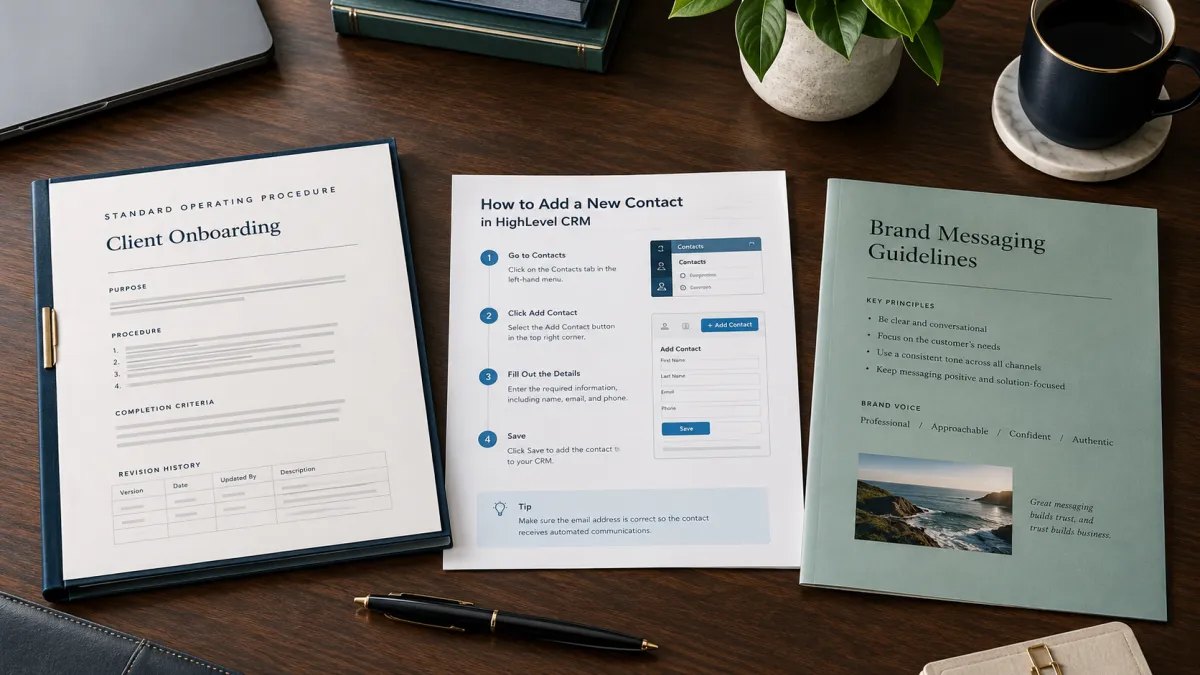
There are actually three different tools that can serve three different purposes: SOPs, job aids, and guidelines.
Understanding the difference makes documentation much easier to manage.
SOP: Establish the Standard
An SOP establishes the required standard and process.
It answers questions such as:
What needs to happen?
In what order?
What standard needs to be followed?
What happens when something falls outside the normal process?
What does "complete" look like?
The SOP is the authoritative source for the process.
It should contain enough information for the intended user to perform the work consistently, but it does not need to explain every possible detail of how someone interacts with a piece of software.
Job Aid: Show How
A job aid is where the detailed "how-to" information belongs.
It might include:
screenshots
annotated examples
videos
diagrams
short videos
detailed software instructions
visual examples
step-by-step reference material
If someone needs to see exactly which button to click in Adobe Acrobat, that may belong in a job aid rather than the SOP itself.
This keeps the SOP readable while still giving the employee the resources they need.
Your SOP should tell someone what the standard process is. The job aid can show them exactly how to execute a complicated part of it.
Guideline: Establish the Guardrails
Guidelines are useful when there is a standard, but there is not necessarily one correct way to accomplish the task.
Consider a marketing flyer.
The company logo may always need to appear. The brand colors may need to be used. Certain information may always be required, but the logo does not necessarily have to appear in exactly the same location on every flyer. A designer can exercise judgment.
Compare that with company letterhead, where the placement of the company's contact information may be specifically prescribed.
The first situation needs a guideline. The second may need a more specific standard. Guidelines establish the boundaries within which people can make decisions. That distinction matters because a business can create consistency without making every piece of work look like it was produced by a machine.
The Eight Components of an Effective SOP
Once you know what belongs in an SOP, the structure becomes surprisingly simple.
A useful SOP does not need to be enormous. It needs to contain the information necessary to establish the standard and make the process repeatable.
1. Title
The title should clearly identify the process.
A good title makes the document easy to find and immediately tells the reader what they are looking at.
"Creating Fillable Forms in Adobe Acrobat" is much more useful than "Forms Process."
Clarity starts with the name.
2. Purpose
The purpose explains why the procedure exists and what it is intended to accomplish.
This gives the reader context before they begin.
It also helps prevent the SOP from becoming a collection of instructions without a clear objective.
If the purpose of a process is to ensure every customer receives the required onboarding documentation before their account is activated, that purpose provides context for everything that follows.
3. Related Documents & Standards
Most processes do not exist in isolation.
An SOP may depend on a company standard, form, checklist, job aid, or another SOP.
Listing those related resources creates a connected documentation system instead of a collection of disconnected files.
It also gives the reader a place to go when the SOP references something outside of itself.
If nothing applies, simply state None.
4. Procedure
This is the core of the SOP.
The procedure should provide the process in clear, sequential steps. The steps should be concise, action-oriented, and detailed enough for the intended user to complete the process consistently.
Notice the distinction between enough information and every piece of information.
An SOP does not need to document every click, keystroke, or possible variation.
If detailed instructions would make the SOP unnecessarily long, that information may belong in a separate job aid.
This is one of the easiest ways to keep documentation useful.
5. Decision Points / Exceptions
Real businesses are messy.
The standard process may work most of the time, but there will be situations where something different needs to happen.
Those situations belong in the SOP.
What happens if required information is missing? What happens if a customer requests something outside the standard process? When should an issue be escalated?
Documenting approved exceptions prevents employees from having to guess.
It also keeps exceptions from quietly becoming new versions of the process.
6. Approved Communication
Some processes involve communication with customers, vendors, employees, or other stakeholders.
When specific language has been approved for use, it can be included directly in the SOP.
This might include:
customer-facing scripts
email templates
text message snippets
standard responses
required notices
This is particularly valuable when consistency matters but employees should not have to recreate the language every time.
7. Completion Criteria
How do you know the process is actually finished?
Completion criteria define what must be true before the procedure is considered complete.
Depending on the process, that might mean a form has been completed, a file has been saved in the correct location, a customer has received a required communication, or a final review has been completed.
This section closes the loop.
Without it, a procedure can tell someone what to do without clearly defining when they are done.
8. Revision History
Processes change. Software gets updated. Businesses change their requirements. Better methods are discovered. A revision history provides a simple record of those changes. At minimum, it should identify the version, date, person making the update, and a brief description of what changed. This may seem like administrative detail, but it becomes increasingly valuable as a documentation library grows.
Instantly Download the Free SOP Master Template

What Doesn't Belong in Every SOP
There are plenty of SOP frameworks that include sections for scope, responsible roles, prerequisites, required resources, definitions, risk assessments, and other information. Those sections can be useful when a particular process requires them. They do not need to be mandatory simply because someone created a template that says they should be. The structure should serve the process, not the other way around.
If a process needs to identify who is responsible for a particular step, include that information where it is relevant.
If someone needs access to a specific system, address that where it makes sense.
If a process has no exceptions, say None.
There is no value in creating a section simply to fill a template. The value is consistent structure without unnecessary complexity.
Build the Document Around the Outcome
A common documentation mistake is starting with the question:
"What can I possibly put in this SOP?"
A better question is:
"What does someone need to know to consistently achieve the intended outcome?"
That shift changes everything when you start with the outcome. Then identify the standards that need to be consistent. From there, identify the normal process. Next, identify the situations that require a different decision. Finally, determine whether any of the detailed instructions belong in a separate job aid.
This approach naturally keeps the SOP focused. It also makes it easier to identify information that does not belong. If a detail does not establish the standard, help someone perform the task, define an exception, or clarify completion, ask whether it needs to be there at all.
Then ask one final question:
Does this information establish the standard, help someone perform the task, or define the boundaries within which they should operate?
If it establishes the standard, it probably belongs in the SOP.
If it shows someone exactly how to perform something, it may belong in a job aid.
If it establishes boundaries while leaving room for judgment, it may belong in a guideline.
And if it does none of those things, it may not need to be documented at all.
The best documentation does not make a business feel more complicated.
It makes the business easier to operate.
Are you not already subscribed to our mailing list? Click here, or use the following link to get our articles delivered directly to your inbox: LiquidityJournal.com/Subscribe